Best Shared Inbox Tools for Teams in 2026

The best shared inbox tools for US teams in 2026 are Front, Help Scout, Hiver, Freshdesk, and HubSpot Service Hub, each offering a distinct combination of automation, channel coverage, and pricing that fits different team sizes and workflows. Whether you’re managing a support queue, a sales pipeline, or a WhatsApp team inbox, the right platform eliminates the chaos of forwarded emails and reply-all threads. The comparison table below gives you the full picture at a glance.
| Tool | Best For | Key Features | Starting Price | Integrations | Platform |
|---|---|---|---|---|---|
| HubSpot | CRM-integrated teams | Shared inbox, CRM sync, automation | Free tier available | 1,000+ apps | Web, mobile |
| Front | Workflow automation | Multi-channel, rules engine, analytics | $19/user/mo | Salesforce, Slack, Jira | Web, desktop, mobile |
| Help Scout | Scalable CS teams | Email-to-ticket, Docs, live chat | $19/user/mo | Shopify, HubSpot, Zapier | Web, mobile |
| Hiver | Google Workspace teams | Gmail-native, collision detection | $15/user/mo | Google Workspace, Slack | Web (Gmail) |
| Gmelius | Gmail automation | Browser extension, shared labels | $15/user/mo | Gmail, Slack, Trello | Web (Gmail) |
| Missive | Chat + email teams | Real-time chat, multi-channel | $15/user/mo | Zapier, Twilio, Shopify | Web, desktop, mobile |
| SupportBee | Small teams | Simple ticketing, shared inbox | — | Zapier, Slack | Web |
| Salesmate | Sales teams | CRM pipeline, shared inbox | $39/user/mo | Google, Microsoft, Zapier | Web, mobile |
| HappyFox | Enterprise support | SLAs, reporting, automation | Custom pricing | Salesforce, Jira, Slack | Web, mobile |
| Kayako | Omnichannel support | Live chat, email, self-service | $15/user/mo | Salesforce, Zapier | Web |
| HubSpot Service Hub | HubSpot CRM users | Ticketing, feedback, CRM sync | Free tier available | HubSpot ecosystem | Web, mobile |
| Drag | Gmail kanban boards | Visual boards, Gmail-native | $8/user/mo | Google Workspace | Web (Gmail) |
| ProProfs Help Desk | AI-assisted support | AI drafting, auto-routing | $19/user/mo | Zapier, Salesforce | Web |
| Freshdesk | All-size teams | Omnichannel, automation, AI | Free tier available | 1,000+ apps | Web, mobile |
| Groove | Small business | Simple ticketing, shared inbox | $8/user/mo | Shopify, Slack, Zapier | Web |
| Helpwise | Multi-channel teams | Email, SMS, chat inbox | $12/user/mo | Zapier, Slack, HubSpot | Web, mobile |
| Google Collaborative Inbox | Google Workspace orgs | Native Gmail groups, assignment | Included in Workspace | Google ecosystem | Web |
| Outlook Shared Mailbox | Microsoft 365 orgs | Native Outlook sharing, Exchange | Included in M365 | Microsoft ecosystem | Web, desktop, mobile |
| Thryv Command Center | SMB all-in-one | CRM, marketing, shared inbox | Custom pricing | Thryv ecosystem | Web, mobile |
| Zoho Mail | Zoho ecosystem teams | Shared mailbox, Zoho CRM sync | Free tier available | Zoho suite, Zapier | Web, mobile |
| Helpmonks | Automation-focused teams | Shared inbox, workflows, tagging | $19/mo flat | Zapier, Slack | Web |
| ClientFlow | Agencies | Client email workflows, shared inbox | $19/user/mo | Gmail, Outlook | Web |
| Respond.io | Messaging app teams | WhatsApp, SMS, social inbox | $79/mo (team) | WhatsApp, Telegram, Slack | Web, mobile |
| Intercom | Customer engagement | Live chat, email, AI bot | $39/user/mo | Salesforce, HubSpot, Stripe | Web, mobile |
| Loop Email | Synchronous teams | Shared inbox, in-thread chat | $8/user/mo | Gmail, Outlook | Web, desktop, mobile |
| Emailgistics | Routing and SLA teams | Smart routing, escalation rules | Custom pricing | Microsoft 365 | Web (Outlook) |
| eDesk | E-commerce teams | Multi-channel, marketplace sync | $79/mo | Amazon, eBay, Shopify | Web, mobile |
| Crisp | Small biz chat + email | Chatbot, shared inbox, live chat | Free tier available | WordPress, Slack, Zapier | Web, mobile |
| Canary for Support | AI-augmented support | AI handling, ticket tracking, analytics | Custom pricing | Email platforms | Web |
| Desk365 | Affordable ticketing | Multi-channel, automation, chat | $12/user/mo | Microsoft Teams, Zapier | Web |
| Helprace | Self-service + inbox | Shared inbox, knowledge base | — | Zapier, API | Web |
What are shared inbox tools and why does your team need them?
A shared inbox tool is software that lets multiple team members read, assign, and reply to messages from a single email address, like support@yourcompany.com, without stepping on each other’s work. Traditional email fails teams fast. When five people share one Gmail login, you get duplicate replies, missed messages, and zero accountability. Shared inbox software fixes that with structure.
The core benefits your team gets immediately:
- Collision detection prevents two agents from drafting replies to the same customer at the same time. Without it, duplicate responses damage your team’s credibility instantly.
- Internal notes and @mentions let teammates discuss a ticket privately, without the customer ever seeing the conversation.
- Assignment and tagging create clear ownership, so nothing sits unanswered in a queue.
- Automated routing sends messages to the right person based on keywords, sender, or workload.
- Multichannel support unifies email, WhatsApp, live chat, and SMS into one queue, so your team stops context-switching between apps.
- Audit trails and analytics show response times, volume trends, and individual performance, giving managers real visibility.
The shift from a shared Gmail login to a proper collaborative inbox platform also improves First Response Time measurably. When every message has an owner and a status, nothing falls through the cracks.
In-depth profiles of the top shared inbox software for 2026
The 31 tools below cover every major use case, from Gmail-native plugins to enterprise omnichannel platforms. Pricing reflects publicly listed rates as of 2026.
Front
Front is the go-to for teams that need serious workflow automation across multiple channels. It handles email, SMS, WhatsApp, and social messages in one interface, with a rules engine that can auto-assign, tag, and escalate based on virtually any condition. The analytics suite is genuinely deep, covering SLA tracking, response times, and team workload. At $19/user/month on the Starter plan, it’s priced for professional teams, not casual users.

Help Scout
Help Scout converts every inbound email into a trackable conversation without making the experience feel like a ticket system to your customers. Replies go out looking like normal emails. The Docs feature adds a self-service knowledge base, and the live chat widget connects back to the same shared queue. It’s the strongest pick for customer support teams that want to scale without adding complexity.

Hiver
Hiver lives entirely inside Gmail, which is its biggest advantage. Your team never leaves their inbox. Shared labels, collision detection, and internal notes appear as Gmail-native features, so adoption is nearly instant. The $15/user/month Lite plan covers most small teams. Google Workspace teams that dread migration will find Hiver the path of least resistance.
Gmelius
Gmelius works as a browser extension layered on top of Gmail, adding shared labels, kanban boards, and automation rules without any migration. It’s particularly strong for teams that want to automate repetitive routing tasks inside Google Workspace. The extension model means IT involvement is minimal, which matters for small teams moving fast.
Missive
Missive combines a shared inbox with real-time team chat inside the same thread. You can discuss a customer email with a colleague in a sidebar conversation, then send the reply, all without switching apps. It supports email, SMS, WhatsApp, and social channels. For teams where internal communication and customer replies are equally time-sensitive, Missive is the most natural fit.
Freshdesk
Freshdesk is one of the few tools on this list with a genuinely usable free tier for small teams. The paid plans add omnichannel support, AI-powered automation, and advanced reporting. It integrates with over 1,000 apps, making it practical for teams already running complex tech stacks. The platform scales from a two-person startup to an enterprise support center without requiring a platform switch.
HubSpot and HubSpot Service Hub
HubSpot’s shared inbox connects directly to its CRM, so every email thread carries full customer history, deal stage, and contact data. HubSpot Service Hub extends that with ticketing, customer feedback surveys, and a knowledge base. Both offer free tiers. If your team already runs HubSpot for marketing or sales, adding the shared inbox costs nothing extra and eliminates data silos immediately.
Drag
Drag turns Gmail into a kanban-style workspace. Each email becomes a card on a visual board, and teams can move cards through stages, assign them, add notes, and set due dates. DragApp’s Gmail integration requires minimal IT setup and works inside existing Google Workspace environments. At $8/user/month, it’s one of the most affordable Gmail-native options available.
Respond.io
Respond.io is built specifically for teams managing WhatsApp, Telegram, Facebook Messenger, Instagram, and SMS alongside email. If your team handles a WhatsApp team inbox at scale, Respond.io is the most purpose-built option on this list. It supports contact assignment, conversation analytics, and automated workflows across every messaging channel. The $79/month team plan covers up to 10 users.
Intercom
Intercom centers on live chat and proactive customer messaging, with a shared team inbox that handles both inbound and outbound conversations. The AI bot handles common questions automatically, escalating to a human agent when needed. It integrates with Salesforce, HubSpot, and Stripe. At $39/user/month, it’s positioned for growth-stage companies that prioritize customer engagement over pure ticket volume.
Zoho Mail
Zoho Mail’s shared mailbox feature is affordable and integrates cleanly with the broader Zoho ecosystem, including Zoho CRM and Zoho Desk. Zoho TeamInbox adds auto-responses, assignment, tagging, audit logs, and mobile access on top of the core email platform. For teams already using Zoho products, the shared inbox adds almost no incremental cost.
Emailgistics
Emailgistics is built for Outlook-based teams that need intelligent routing and SLA enforcement without leaving Microsoft 365. It assigns emails based on rules, tracks response times, and escalates overdue messages automatically. Teams with strict service-level commitments and a Microsoft-first environment will find it fits better than any Gmail-native tool.
eDesk
eDesk is purpose-built for e-commerce. It pulls messages from Amazon, eBay, Shopify, and other marketplaces into a single shared queue, matching each message to the relevant order automatically. For support teams managing customer emails across multiple sales channels, that automatic order context saves hours of manual lookup every day.
Canary for Support
Canary’s shared inbox uses AI to handle common questions automatically, tracks ticket status, and provides customer satisfaction analytics. It scales easily for growing teams and reduces email volume by resolving repetitive inquiries without agent involvement. Teams that want AI augmentation without a full platform overhaul will find it a practical starting point.
The rest of the field
Several tools serve specific niches well without needing a full breakdown. SupportBee suits small teams that want simple ticketing without configuration overhead. Salesmate connects a shared inbox directly to a sales CRM pipeline, making it the natural pick for sales teams. HappyFox targets enterprise teams with SLA management and detailed reporting. Kayako covers omnichannel support including live chat. Groove is a clean, affordable option for small businesses focused on email support. Helpwise handles email, SMS, and chat in one queue. Google Collaborative Inbox and Outlook Shared Mailbox are built-in options for teams already on Google Workspace or Microsoft 365 respectively, requiring no additional software. Thryv Command Center bundles CRM, marketing, and shared inbox for SMBs. Helpmonks offers flat-rate pricing with solid automation. ClientFlow is designed for agencies managing client email workflows. Loop Email focuses on in-thread team conversations. Crisp combines a chatbot with a shared inbox for small businesses. Desk365 delivers affordable ticketing with Microsoft Teams integration. Helprace pairs a shared inbox with a customer knowledge base. ProProfs Help Desk adds AI drafting and automated routing for teams focused on customer satisfaction.
How to choose the right shared inbox tool for your team
The decision comes down to five practical questions, not feature checklists.
1. Where does your team already live? If your team runs Google Workspace, tools like Hiver, Gmelius, and Drag offer faster adoption because they integrate directly into Gmail. Microsoft 365 teams should look at Emailgistics or Outlook Shared Mailbox first. Forcing a team onto an unfamiliar platform adds training time and reduces the chance of consistent adoption.
2. Which channels do your customers use? Email-only teams have the widest choice. Teams managing WhatsApp, SMS, or social messaging need a platform built for multichannel from the ground up, like Respond.io, Missive, or Freshdesk. A best WhatsApp shared inbox setup requires a tool that handles WhatsApp Business API natively, not as an afterthought.
3. Do you need CRM data inside the inbox? If your agents need customer history, deal stage, or purchase data while replying, choose a tool with native CRM integration. HubSpot, Salesmate, and Intercom all pull CRM context into the inbox view. Tools without CRM integration require agents to switch tabs constantly.
4. What is your real total cost of ownership? Published per-user pricing rarely tells the full story. Watch for per-channel add-ons, API call limits, storage fees, and premium support charges. A tool priced at $12/user/month can reach $40/user/month once you add the channels and integrations your team actually needs. Trial the tool with your real workflow before committing to an annual plan.
5. How will you handle change management? The best shared inbox software fails if the team doesn’t use it consistently. Prioritize tools that require minimal retraining. Browser extension-based tools like Gmelius and Drag that work inside Gmail see faster adoption because they don’t ask agents to change their daily habits.
Pro Tip: Before signing an annual contract, run a two-week trial with your busiest email queue. Measure First Response Time at the start and end of the trial. If the number doesn’t improve, the tool isn’t the right fit regardless of its feature list.
Key evaluation criteria to score each tool against:
- Collision detection quality (does it show real-time “someone is typing” indicators?)
- Automation depth (can you build multi-step rules without developer help?)
- Mobile app quality (does it support full functionality, not just read-only access?)
- Security and compliance (SOC 2, GDPR, HIPAA availability for regulated industries)
- Customer support quality (live chat, dedicated onboarding, or documentation only?)
- Pricing transparency (are all features visible in the public pricing page?)
AI and automation are changing what shared inboxes can do
The most forward-looking teams aren’t just using shared inbox software to organize email. They’re layering AI on top to handle the repetitive work automatically, freeing agents for conversations that actually need a human.
AI drafting tools, now built into platforms like ProProfs Help Desk, Canary, and Freshdesk, generate reply suggestions based on conversation history and knowledge base content. An agent reviews and sends, cutting average handle time without sacrificing quality. Automated routing goes further, assigning messages based on agent skill, workload, or customer tier, so the right person gets the right message without a manager manually triaging the queue.
Respond.io and Intercom already push in this direction for messaging channels. For local businesses managing phone calls, WhatsApp messages, and appointment bookings simultaneously, the gap between a shared inbox and a full AI communication layer becomes obvious fast. A shared inbox organizes the messages your team receives. An AI communication platform handles many of them before a team member ever sees them.
How long does it take to implement a shared inbox tool?
Implementation timelines vary more than vendors admit. A Gmail-native tool like Hiver or Drag can be live in under an hour for a small team. A full platform migration to Freshdesk or Front, with custom automation rules, CRM integration, and agent training, typically takes two to four weeks.
The realistic phases for most teams:
- Days 1–3: Account setup, connecting email channels, inviting team members, and configuring basic assignment rules.
- Days 4–7: Building automation workflows, setting up tags and labels, and connecting integrations like Slack or your CRM.
- Week 2: Agent training, running the new tool in parallel with the old system, and measuring baseline response times.
- Weeks 3–4: Full cutover, refining rules based on real usage, and reviewing analytics for the first time.
Change management is where most implementations stall. Agents revert to old habits when the new tool feels slower or unfamiliar. Choosing a platform that preserves inbox neutrality, meaning it works inside the email client your team already uses, cuts that risk significantly. A two-week parallel run, where both systems handle real messages, gives your team time to build confidence before the old system goes dark.
Finditx handles what shared inbox tools can’t
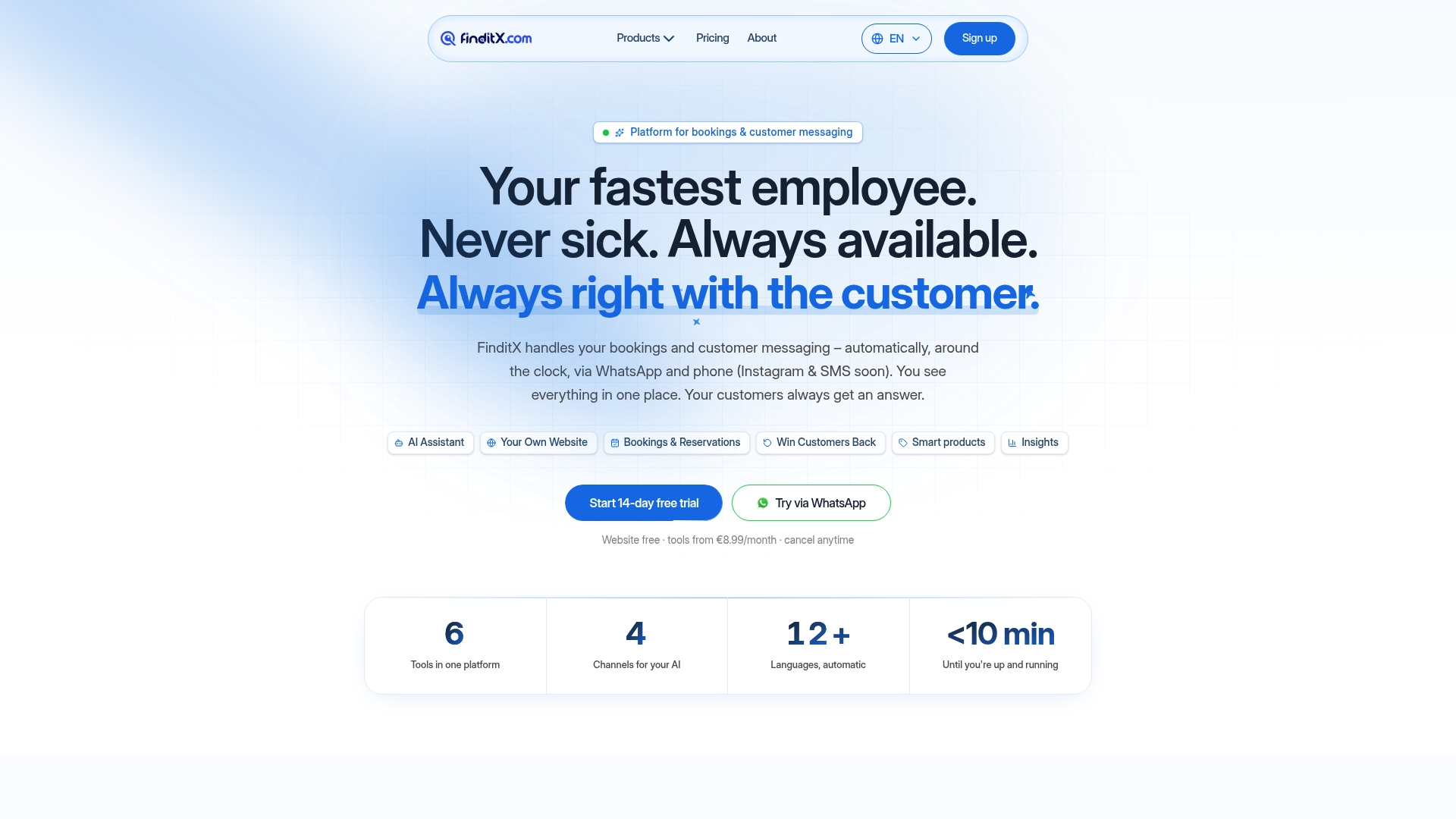
Most shared inbox tools do one thing well: they organize the messages your team already receives. Finditx takes a different approach. Instead of waiting for a customer to send an email, Finditx’s AI assistant answers phone calls, responds to WhatsApp messages, and handles appointment bookings automatically, around the clock, without a team member involved.
For local businesses like restaurants, salons, and medical practices, that distinction is the difference between a missed booking and a confirmed one. While your team is focused on serving customers in person, Finditx is handling the next inquiry on WhatsApp or the phone. It also re-engages inactive customers automatically, sending personalized messages to bring them back without any manual effort from your team.
If you’re already using a shared inbox tool and finding that it still leaves gaps, like unanswered calls after hours or WhatsApp messages that pile up overnight, Finditx fills exactly those gaps. You can explore flexible pricing plans that start free and scale with your business. It’s not a replacement for a team inbox. It’s what runs when your team can’t.
Key Takeaways
The strongest shared inbox tools combine collision detection, automation, and multichannel support to reduce response times and eliminate duplicate replies across your team’s communication channels.
| Point | Details |
|---|---|
| Match the tool to your email platform | Gmail teams adopt Hiver, Gmelius, or Drag fastest; Microsoft 365 teams should start with Emailgistics or Outlook Shared Mailbox. |
| Collision detection is non-negotiable | Without it, duplicate replies damage customer trust and waste agent time on every busy day. |
| Total cost of ownership exceeds list price | Per-channel add-ons, API limits, and premium support fees can multiply the base per-user rate significantly. |
| AI automation extends inbox capability | Tools like Freshdesk, ProProfs Help Desk, and Canary use AI drafting and routing to cut handle time without reducing quality. |
| Finditx covers the gaps inbox tools leave | Finditx automates phone, WhatsApp, and booking responses around the clock, handling inquiries before they reach a shared queue. |
Recommended
Fewer tools. More business.
FinditX is the operating platform for anyone running a business. Presence, AI assistant, and modules — pay only for what you actually use.